
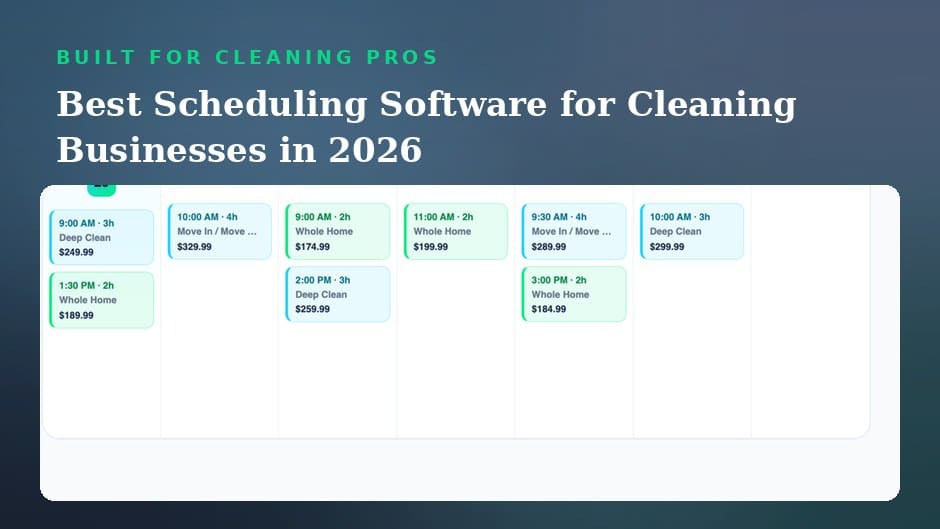
Two customers, one Saturday, both certain they booked you for 9 am. Scheduling software for cleaning businesses exists so that morning never happens to you.
If you have run a cleaning company for more than a year, you have lived some version of that Saturday. Both bookings were made in good faith. One came by text on a Tuesday night, the other in a driveway conversation two weeks earlier, and only one made it into the notebook. Now you are standing in a kitchen at 8:55 apologizing to somebody, and the somebody you disappoint may not call again. The failure was never effort. The failure was that the schedule lived in three places at once. This post is a close look at the scheduling side of running a cleaning business: what a real scheduling system prevents, what a scheduled day actually feels like, and why recurring visits deserve their own strategy.
What Scheduling Software for Cleaning Businesses Actually Prevents
The value of a scheduling tool is easiest to see as a list of expensive moments that stop happening. Each row below is a failure that shows up constantly in cleaning work, what it quietly costs, and what changes when every job lives in one calendar with one source of truth.
| Scheduling failure | What it costs you | What the software does instead |
|---|---|---|
| Double booking | An apology, a scramble, often a lost customer | One calendar shows the conflict before you confirm |
| The forgotten job | A no show by you, the worst kind | Every confirmed job sits on the day it belongs to |
| The customer who forgot | A locked door and a wasted drive | A written confirmation message the evening before |
| Back to back jobs across town | Late arrivals all afternoon | You see the whole day and build in honest drive time |
| The schedule in your head | You are the only person who can answer anything | The calendar exists outside your memory |
Notice that none of these fixes require anything clever. They require a single place where the schedule lives. That is the whole trick, and it is why the calendar should sit in the same dashboard as your estimates, payments, and customer messages rather than alone in a separate app.
A Day Run on Cleaning Business Scheduling Software
Features lists blur together, so here is the same idea told as a working day. The tool underneath this narrative is House Fly Pro, where the calendar shares a dashboard with everything else the business needs.
7 am: The day is already decided
Coffee in hand, you open the dashboard. Three jobs today, in order, with addresses and the notes that make service personal: the gate code on the first house, the dog named Biscuit at the second, the customer at the third who wants the sheets changed. Nothing to reconstruct from texts, nothing to remember. You set these hours yourself, so Thursday afternoon is blocked for the school run, and the software respects that block the way an employee never quite would.
Midday: A change arrives without a phone call
While you are finishing house two, a message comes in through the platform. The afternoon customer wants the inside of the fridge added. You reply from the dashboard, send a small written price addition she approves on the spot, and the job’s scope updates without a single voicemail. Because the conversation runs through House Fly Pro, your personal number stays out of it entirely.
8 pm: Tomorrow confirms itself
The evening habit takes five minutes: glance at tomorrow, send short confirmation messages, done. Confirmed customers are home, gates are unlocked, and the wasted drive to a locked door mostly disappears from your life. If you are out, the dashboard opens in your phone’s browser, so checking tomorrow from the couch is easy. Five minutes tonight buys a smooth day tomorrow, and if you want to see how that feels with your own calendar, you can open a House Fly Pro account and load this week’s jobs free for 14 days.
Recurring Schedules: The Backbone of Cleaning Business Scheduling
One truth separates full calendars from stressful ones: regulars are the schedule. A weekly customer is 52 jobs a year that you never have to sell again, and a customer on an every two weeks rhythm is 26. Build the calendar by placing those anchors first, then fit one time deep cleans and move out jobs into the gaps they leave. The anchors also make problems smaller. When a one time job cancels, you still have a week shaped by regulars; when a regular reschedules, the written thread makes it painless. This deserves more space than one section can give it, so we wrote a full strategy piece on filling your schedule with recurring cleaning clients, including the revenue math and a win back plan for lapsed regulars.
Choosing Scheduling Software for Your Cleaning Business in 2026
Demand for cleaning work is broad and steady, with millions employed in the field according to the Bureau of Labor Statistics outlook for janitors and building cleaners, so for most owners the scarce resource is not customers. It is hours. Pick the tool that protects your hours, using three tests.
The one place test
Can you see every job, message the customer about it, price added work, and collect payment without leaving the dashboard? A calendar that cannot touch the money side leaves you stitching apps together, which is how things fall through seams. If your client records are still scattered, start with our tutorial on organizing your cleaning client list, because the calendar is only as good as the list underneath it.
The price behavior test
Ask what the bill does when you hire. House Fly Pro folds scheduling into $19.99 a month for one person plus $9.99 for each person you add, while a Jobber seat costs $29; our roundup of the best maid service software for 2026 lays the options side by side.
The professionalism test
Industry groups like ISSA have long tied professional standards to customer trust, and nothing signals professionalism like reliability: arriving when promised, confirming in writing, and never losing a booking. If the software makes those behaviors automatic, it passes. For the wider view of everything beyond the calendar, our complete 2026 guide to cleaning business software covers the full stack.
Never explain a double booking again. House Fly Pro puts your calendar, estimates, payments, and customer messages in one dashboard, sets you free to work your own hours, and costs $19.99 a month for one person plus $9.99 for each person you add. Try it free for 14 days. Start with House Fly Pro and give every job one home.
Frequently Asked Questions
How does scheduling software prevent double booking a cleaning job?
Every job goes into one shared calendar, so a conflict is visible before you confirm the second booking. Because the calendar is the single source of truth, jobs agreed by text or in person get entered once and stay visible.
Can I set my own working hours in House Fly Pro?
Yes. You decide the hours and days you work, block out personal time, and build the calendar around your life. The software organizes your schedule rather than dictating it.
Should recurring cleaning jobs be managed in scheduling software?
Absolutely, and they should go in first. Weekly and every two weeks regulars anchor the calendar, and one time jobs then fill the remaining gaps. This keeps revenue predictable and makes cancellations easier to absorb.
Does House Fly Pro scheduling work on a phone?
The full product is a web dashboard that works in any browser, including the one on your phone, so you can check your day on the go. The dashboard is where the complete scheduling, estimates, payments, and messaging experience lives.
