
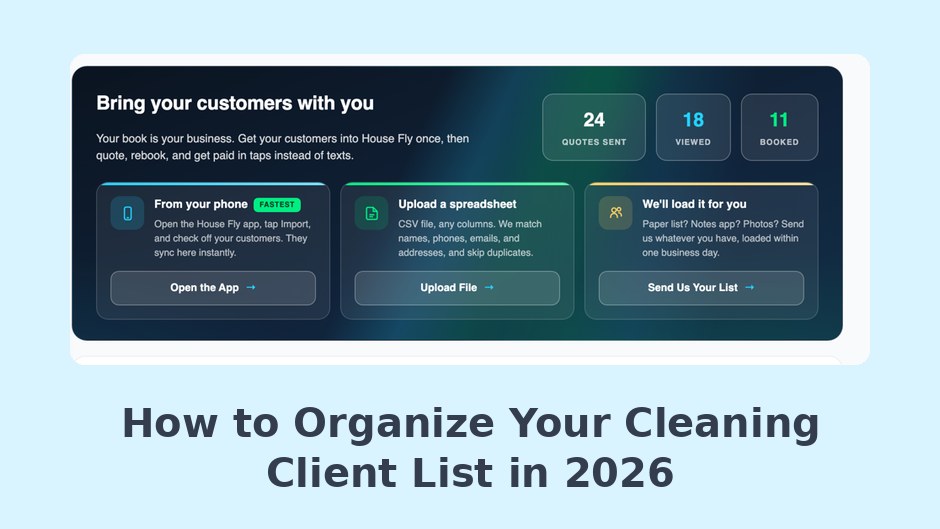
To organize your cleaning client list, pick one system of record, move every client into it once, and update it the day anything changes. This tutorial shows exactly how.
Right now your client list probably lives in four places: your phone contacts, a notebook in the van, a long scroll of old text threads, and your memory. Every one of those places works until the day it does not, and that day usually involves a forgotten gate code or a regular who quietly stopped booking without anyone noticing. The fix is a single afternoon of work, and this tutorial walks through it step by step. We use House Fly Pro as the destination system because it offers three different import paths and then puts the list to work sending estimates, collecting payments, and messaging clients. If you want to work along, set up an account first so the list has somewhere to land; the first 14 days are a free trial.
Before You Import: Get Your Client List Into Five Columns
Whichever path you take below, the work goes faster if you know what a complete client record looks like. Five columns cover it. The Small Business Administration’s business management guidance treats organized customer records as a core asset of a healthy small company, and for a cleaning business these five fields are that asset in miniature.
| Column | What goes in it | Why it earns its place |
|---|---|---|
| Name | Full name, spelled the way they use it | Every message and estimate starts here |
| Phone | Mobile number | Texting is how most clients want to hear from you |
| Primary address | Estimates and receipts need a second channel | |
| Address | Street address plus unit or gate details | The job happens at a place, and drive time planning depends on it |
| Notes | Pets, products, parking, preferences, frequency, rate | The details that make service feel personal live here |
Do not aim for perfect. Aim for one pass. A record with a name and a phone number can be finished later; a client who exists only in your memory cannot. If you currently track cleaning frequency and rates somewhere separate, fold them into the notes column now, because having the rate sit beside the address saves you a lookup every single time a regular books.
From here, House Fly Pro gives you three roads into the dashboard. Pick exactly one and follow it today.

Path 1: Organize Your Cleaning Client List With a Spreadsheet Upload
The steps
- Gather your file. Export clients from your old software, or build a fresh sheet in Excel or Google Sheets using the five columns above.
- Tidy the columns. One client per row, one header row at the top, no merged cells or color coding tricks.
- Save as CSV or Excel and upload it in the dashboard.
- Spot check ten records. Open a few clients and confirm phones and addresses landed where they should.
Choose the spreadsheet path if
Your clients already live in a sheet or in software that can export one. This is the cleanest route for anyone leaving another platform, because the export file becomes the import file with almost no editing in between.
Path 2: Turn Phone Contacts Into an Organized Client List
The steps
- Run the contacts sync from the dashboard and let it read your phone book.
- Select the actual clients. Your phone holds everyone you have ever met, so pick out the customers and leave your dentist behind.
- Fill the gaps. Contacts usually carry names and numbers but thin addresses and no notes, so add those to each record as you go.
Choose the contacts path if
You have run the business by text for years and your phone is where the relationships live. Solo cleaners overwhelmingly fall into this group, and for them the sync is usually the fastest of the three roads. If that sounds like you, our guide to software for solo cleaners is written for exactly your situation.
Path 3: Email Your Client List and Let House Fly Organize It
The steps
- Gather whatever you have. Photos of the notebook, screenshots of texts, a half finished sheet, a paper stack. Messy is fine.
- Email it all to House Fly. The team builds your client records for you as a white glove service included with the product.
- Review the result. Once the records appear in your dashboard, read through them and correct anything the paperwork got wrong.
Choose the email path if
Your records are a genuine mess, or your evenings are already full. This path exists so that “my paperwork is a disaster” stops being the reason the list never gets organized. Your total time investment is one email and one review.
Keep the Cleaning Client List Organized After the Import
The import is the project; staying organized is a set of small habits. Add every new client to the dashboard the day you meet them, never “later”. Write down the gate code, the dog’s name, and the product preference while you are still in the driveway. Once a month, scan for regulars who have gone quiet and reach out before the silence becomes a goodbye. The mentors at SCORE hammer this point with small businesses constantly: keeping a customer costs far less than winning a new one, and keeping starts with noticing. Treat the dashboard as the single source of truth from this day forward: when a detail changes, it changes there first, and the notebook in the van gets retired with honors. When you are ready to go deeper on structuring records and client history, our explainer on what a small cleaning company actually needs from a CRM picks up where this tutorial ends, and the complete 2026 software guide covers everything around it.
An organized client list starts earning the moment it has one home, because the same records that hold the gate codes can now receive estimates, payments, and messages. Open a House Fly Pro account, pick whichever of the three paths fits the state of your records, and by tonight the most valuable asset your cleaning business owns will finally live somewhere safe. The first 14 days are a free trial, and after that it is $19.99 a month for one person plus $9.99 for each person you add.
Frequently Asked Questions
What columns should a cleaning client list spreadsheet have?
Five columns cover the essentials: name, phone, email, address, and notes. Use the notes column for pets, product preferences, gate codes, cleaning frequency, and the client’s usual rate, since those details are what make service feel personal.
How long does it take to organize a cleaning client list?
Most owners finish in a single afternoon. A clean spreadsheet uploads in minutes, a phone contacts sync takes under an hour including cleanup, and the email path takes only the time needed to send one message and review the finished records.
What if my client records are too messy to import?
Use the email path. Send House Fly whatever you have, including photos of paper notes and screenshots, and the team builds the client records for you. You then review the finished list in your dashboard and correct any details.
