
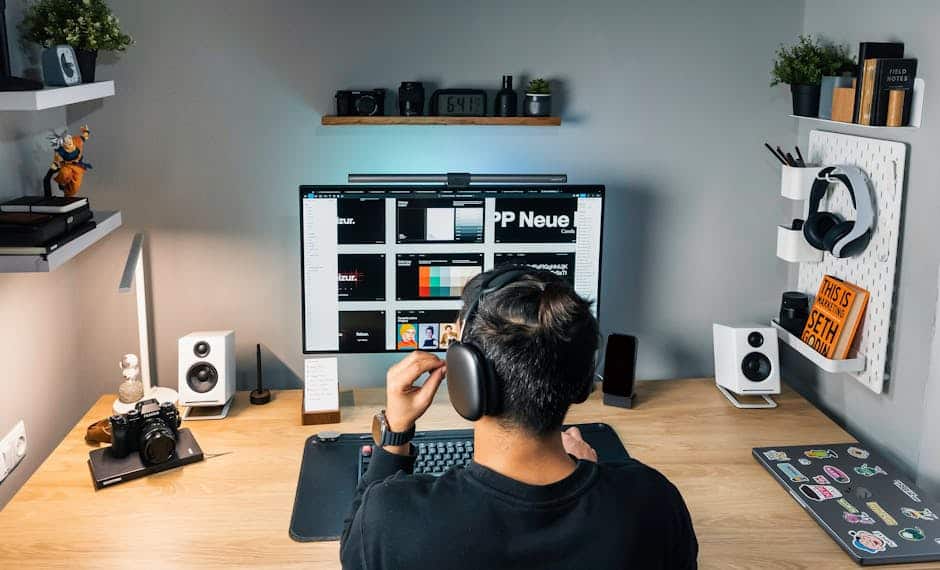

Dallas Home Office Setup Guide
Create a productive home office in Dallas for remote work success. For professionals in Uptown, Lakewood, and Preston Hollow, a dedicated workspace is essential infrastructure. Here’s your 2026 setup guide.
The Dallas market offers unique opportunities and challenges for home office creation. Our relatively affordable housing stock compared to coastal cities means many homeowners have space to dedicate to offices. However, Texas heat demands attention to cooling and comfort. And the mix of historic homes and new construction creates diverse starting points for office projects.
Space Planning and Location
The location of your home office significantly impacts your ability to focus and be productive. Choosing the right space requires honest assessment of your work requirements and household dynamics.
Dedicated rooms offer the best solution when available. A spare bedroom converted to office use provides separation from living areas, allows closing the door at the end of the workday, and accommodates meetings without household distractions. In Lakewood’s historic homes, formal dining rooms or parlors that see little use make excellent office conversions. Newer Uptown condos may have flex spaces specifically designed for this purpose.
When a full room is not available, creative space planning can carve out functional work areas. Closets can be converted to compact offices with desks and shelving built in. Alcoves, spaces under the stairs, and large landings can accommodate desk setups. Room dividers, bookcases, or curtains create visual separation in open floor plans. The key is establishing boundaries that signal “work mode” to both you and household members.
Natural light boosts mood and productivity, but glare on screens creates problems. Rooms facing east capture morning light without afternoon glare. Spaces facing south need window treatments to control intense Texas sun. Rooms facing north provide consistent, indirect light ideal for computer work. Consider your typical work schedule when selecting and orienting your office space.
Noise control is essential for concentration and professional calls. Interior rooms away from street noise work best. Avoid locations near laundry rooms, HVAC equipment, or children’s play areas. If your home lacks quiet spaces, sound dampening panels, white noise machines, and noise canceling headphones help manage acoustic challenges.
Electrical and Technology Infrastructure
Modern home offices demand robust electrical and data infrastructure. Planning these systems properly prevents frustrating limitations later.
Electrical capacity often needs upgrading for home office use. Computers, monitors, printers, and peripherals draw significant power. Older Dallas homes may have insufficient outlets or outdated wiring that cannot safely handle office equipment loads. A licensed electrician can assess your needs and install additional circuits, outlets, and surge protection.
Network connectivity is the lifeline of remote work. Ethernet connections provide the most reliable, fastest internet access. If possible, run Cat6 cabling from your router to your office location. For spaces where wiring is impractical, mesh wireless systems extend strong signals throughout your home. Powerline adapters use electrical wiring to transmit network signals, offering another option for difficult locations.
Cable management keeps your office looking professional and prevents accidents. Plan routes for power cords, network cables, and peripheral connections. Cable raceways, desk grommets, and trays mounted under the desk keep wiring organized and out of sight. Label cables at both ends for easy identification when troubleshooting.
Backup power protects against data loss and work interruption. Uninterruptible power supplies (UPS) provide battery backup during brief outages and surge protection during storms. For home offices with critical work requirements, whole house generators or battery backup systems maintain power during extended outages.
Furniture and Ergonomics
Spending eight hours daily at a desk demands furniture that supports your body properly. Ergonomic investments pay dividends in comfort and long term health.
Your chair is your most important piece of office furniture. Quality ergonomic chairs adjust to support your spine’s natural curves, promote good posture, and reduce strain. Look for adjustable seat height, lumbar support, armrests, and recline tension. Test chairs before buying when possible; what works for one person may not suit another. Expect to invest $300 to $800 for a quality office chair that will last years.
Desk selection balances workspace needs with room constraints. Standard desk height is 29 to 30 inches, but adjustable standing desks allow position changes throughout the day. Surface area should accommodate your computer, documents, and any specialized equipment you use regularly. Depth matters too; 24 to 30 inches provides room for monitors at comfortable viewing distances.
Monitor placement affects neck and eye strain. Screens should sit at arm’s length, with the top of the monitor at or slightly below eye level. Dual monitors boost productivity for many workers but require adequate desk space and proper positioning. Monitor arms free up desk space and allow precise positioning.
Lighting completes the ergonomic picture. Task lighting illuminates work surfaces without creating screen glare. Adjustable desk lamps direct light where needed. Ambient lighting reduces eye strain from monitor contrast. Position lights to avoid reflections on screens, typically to the side rather than behind or directly in front.
Storage and Organization
Effective storage keeps your office functional and professional. Clutter destroys productivity and creates poor impressions during video calls.
File storage needs vary by profession. Some workers are fully digital; others maintain extensive paper records. Assess your actual needs before buying storage furniture. Vertical file cabinets use floor space efficiently. Lateral files provide wider surface areas for occasional use. Fireproof safes protect critical documents and backup drives.
Bookshelves display reference materials and professional credentials while providing storage for supplies and equipment. Shelving built into the walls maximizes space efficiency in smaller offices. Freestanding units offer flexibility for changing needs. Arrange shelves with heavier items low and lighter items high for stability.
Desk organization keeps essential items accessible without creating clutter. Drawer organizers separate supplies. Desktop trays manage incoming and outgoing documents. Cable organizers prevent cord tangles. The goal is clear workspace that supports focus while keeping necessary tools within reach.
Professional office organization services can design custom storage solutions for challenging spaces. Cabinetry built into the walls, closet conversions, and multipurpose furniture maximize efficiency in compact Dallas condos and historic homes with limited space.
Climate Control and Comfort
Texas heat makes climate control essential for year round office comfort. Your office may need individual temperature management separate from the rest of your home.
Supplemental cooling often proves necessary, particularly for offices in converted attics, garages, or rooms with windows facing west. Mini split systems provide efficient cooling without ductwork modifications. Window units offer affordable solutions for smaller spaces. Portable air conditioners provide flexibility but require venting and regular maintenance.
Ceiling fans improve comfort while reducing cooling costs. They create air movement that makes rooms feel cooler without lowering thermostat settings. In Dallas’s climate, fans are practical additions to any office space.
Air quality affects cognitive function and health. Home offices in older homes may have dust, allergens, or volatile organic compounds that impact productivity. Air purifiers remove particulates and improve air quality. Plants add oxygen and humidity while reducing stress. Regular HVAC filter changes maintain system efficiency and air quality.
Ready to create your perfect Dallas home office? Connect with professionals who can transform your space into a productive workplace.
Building a home office in Dallas? Building a home office in Dallas? House Fly connects you with handymen and electricians across DFW.
Dallas Home Office FAQ
How much does a home office setup cost?
Home office setups in Dallas range from $500 for basic configurations to $10,000+ for comprehensive renovations. Essential costs include furniture ($500 to $2,000), technology ($300 to $1,500), and electrical upgrades ($200 to $1,000). Cabinetry built into the walls and custom solutions add $2,000 to $5,000. Start with essentials and upgrade over time.
What are the electrical requirements for a home office?
Home offices need adequate circuits for computers, monitors, printers, and peripherals. Most require 2 to 4 dedicated 20 amp circuits. Older Dallas homes may need panel upgrades to support additional loads. Surge protection is essential for protecting expensive equipment. Consult a licensed electrician for proper assessment and installation.
How do I soundproof my home office?
Soundproofing options include adding weatherstripping around doors, installing acoustic panels on walls, using thick curtains or sound dampening blinds, and adding a white noise machine. For serious sound control, consider professional acoustic treatments or converting interior rooms away from household noise sources.
Can I deduct home office expenses on my taxes?
The home office deduction allows eligible remote workers to deduct a portion of housing costs. Requirements include exclusive and regular use of the space for business. The simplified method offers $5 per square foot up to 300 square feet. The regular method calculates actual expenses. Consult a tax professional for your specific situation.
External Resources:
- OSHA Ergonomics for workplace safety and ergonomic guidelines
- IRS Home Office Deduction for tax information related to home office expenses
- USA.gov for federal tax guidance on home offices